
Contributing to Ryzers#
We welcome contributions to the Ryzers! Whether you’re fixing bugs, adding new features, or creating new packages, your contributions are greatly appreciated.
Creating Your Own Package#
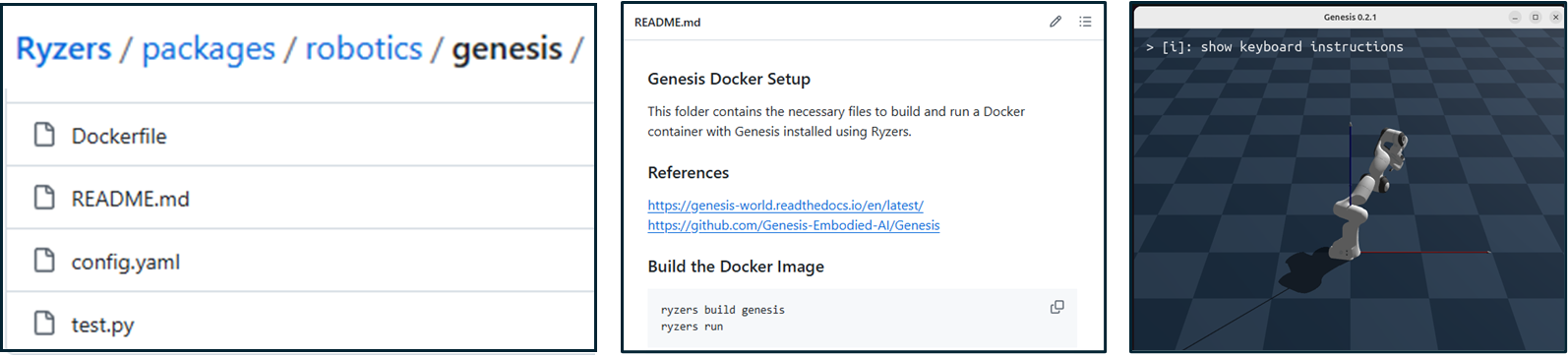
To create your own package, follow the structure and format used in the repository under the packages folder. You can use the packages/robotics/genesis package as an example.
Using an AI Coding Agent#
The fastest way to scaffold a new package is with an AI coding agent. The skills/ directory at the repo root contains agent skills (like new-ryzer) with complete templates, conventions, and reference examples.
Depending on your framework of choice, you can symlink skills/ to the location your tool expects, for example:
# Claude Code
ln -s skills .claude/skills

# Codex
ln -s skills .agents/skills

# Cursor
ln -s skills .cursor/skills

# Antigravity
ln -s skills .agent/skills
This is not necessary, as you can still point your agent to the skill directly, but it does make developmetn more seamless.
Required Package Contents#
At a minimum, only 4 files are needed to create a ryzers package contribution.
Create a
Dockerfile:Start your
Dockerfilewith the following line to ensure it will pull contents from the inital external image (E.g. a PyTorch ROCm image and ourpackages/init/ryzers_envcontents):ARG BASE_IMAGE FROM ${BASE_IMAGE}
Add the necessary commands to install your package or dependencies.
Ensure the
Dockerfileonly includes what is necessary for your package.Ending with a CMD that runs a test script is ideal, as we’ll use this to validate the package (still) works.
Create a
config.yaml:For more details on the config.yaml schema, please see the packages section. The summary schema is below
Use the following schema for your
config.yaml:init_image: <string> # Default: ryzers.RYZERS_DEFAULT_INIT_IMAGE gpu_support: <boolean> # Deafult: True x11_display: <boolean> # Deafult: True build_arguments: - <key1=value1> # e.g., "PYTHON_VERSION=3.10" - <key2=value2> environment_variables: - <key1=value1> # e.g., "HSA_OVERRIDE_GFX_VERSION=11.0.0" - <key2=value2> port_mappings: - <host_port1:container_port1> # e.g., "8888:8888" to expose JupyterLab - <host_port2:container_port2> volume_mappings: - <host_path1:container_path1> # e.g., "$PWD/workspace/.cache/huggingface:/root/.cache/huggingface" for HF caching - <host_path2:container_path2> docker_extra_run_flags: <string> # e.g., "--ulimit memlock=-1" to allow unlimited memory that a process can lock into RAM"
Create a
test.shortest.py:Write a simple bash or Python script to verify that your package was installed correctly. For example:
#!/bin/bash
echo "Running tests for <package_name>..."
<command_to_test_installation>
if [ $? -eq 0 ]; then
  echo "Tests passed!"
else
  echo "Tests failed!"
  exit 1
fi
Create a
README.md:Write a simple README.md that includes:
The name of the package.
A brief description of what the package does.
Instructions for building and running the package.
These 4 files would be placed in a new packages/<category>/<package_name> folder.
A good example package to start from is Genesis. There are the four files required and the README shows a simple call in order to pop up the demo that exits after some time.
Guidelines for a Package Pull Request#
Once you have those minimum files, it can be included in a single pull-request that we will review. A couple last things:
Follow the Repository Structure:
Make sure your package resides in the appropriate category folder within the
packagesfolder. Or feel free to create a new category folder as needed.
Update main repository README.md with a link to the package:
under
Supported Packages, add a link to your new package
Test Your Package:
Before submitting your contribution, test your package by building and running it using standard ryzers build and run calls:
ryzers build <package_name>
ryzers run
Thank you for contributing to Ryzers!