MNIST Classification with an MLP Hugging Face Model#
This notebook shows you how to run a pretrained model hosted on Hugging Face. https://huggingface.co/dacorvo/mnist-mlp
🛠️ Supported Hardware#
This notebook can run in a CPU or in a GPU.
✅ AMD Instinct™ Accelerators
✅ AMD Radeon™ RX/PRO Graphics Cards
✅ AMD EPYC™ Processors
✅ AMD Ryzen™ (AI) Processors
Suggested hardware: AI PC powered by AMD Ryzen™ AI Processors
⚡ Recommended Software Environment#
🎯 Goals#
Show you how to download a model from HuggingFace
Run MNIST on an AMD platform
Explore the MNIST dataset and run inference of one of the test examples
🚀 Run MNIST on an AMD Platform#
Import packages, in particular Hugging Face transformers that helps downloading the model from the Hugging Face repository.
import torch
from transformers import AutoModel
from torchvision import datasets, transforms
import matplotlib.pyplot as plt
from torch.utils.data import DataLoader
Download the model from Hugging Face using transformers.AutoModel by specifying address. See more information on how to download models here.
model = AutoModel.from_pretrained("dacorvo/mnist-mlp", trust_remote_code=True)
Display the model layers, as you can see, this is a very simple model with 3 layers.
Layer name |
Input Features |
Output Features |
|---|---|---|
Input |
784 |
256 |
Middle |
256 |
256 |
Output |
256 |
10 |
print(model)
MLP(
  (input_layer): Linear(in_features=784, out_features=256, bias=True)
  (mid_layer): Linear(in_features=256, out_features=256, bias=True)
  (output_layer): Linear(in_features=256, out_features=10, bias=True)
)
Download MNIST dataset and apply a normalization transformation as well as flattening the dimensions. As you can see, we do not download the training data.
transform = transforms.Compose([
        transforms.ToTensor(),
        transforms.Normalize((0.1307,), (0.3081,)),
        transforms.Lambda(lambda x: torch.flatten(x)),
])

test_set = datasets.MNIST('datasets/', train=False, download=True, transform=transform)
Get a random number to index a sample from the test set
index = int(torch.randint(low=0, high=test_set.test_data.shape[0], size=(1,)))
data, label = test_set[index]
print(f'Random {index=} with {label=}')
Random index=5760 with label=3
/opt/conda/envs/py_3.12/lib/python3.12/site-packages/torchvision/datasets/mnist.py:81: UserWarning: test_data has been renamed data
  warnings.warn("test_data has been renamed data")
Show the hand-written digit that we have randomly selected
fig = plt.figure
plt.imshow(data.reshape(28,28), cmap='gray')
plt.axis('off')
plt.title(f'Label: {int(label)}')
plt.show()
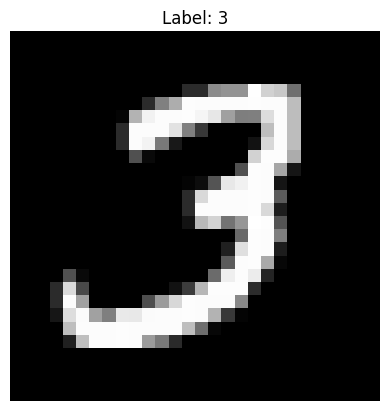
Now, we can run an inference with the sample data on the model.
Note
We run the inference inside of the torch.no_grad() context in order not to track gradients. This saves memory and computation.
with torch.no_grad():
    output = model(data)
output
tensor([3.6064e-12, 5.5341e-13, 1.1835e-07, 1.0000e+00, 1.8841e-17, 7.7729e-09,
        4.6632e-18, 2.2053e-12, 6.5412e-11, 8.4408e-15])
Because the model has ten output neurons, we are going to use torch.argmax to get the index of the neuron with the highest probability.
predicted = torch.argmax(output)
predicted
tensor(3)
We can now check if the class we got after inference is the correct one.
print(f'Is the prediction correct? {predicted == label}')
Is the prediction correct? True
Compute the accuracy of the downloaded model by checking the complete test set.
We first create a DataLoader object that we will use to iterate over the test images. Using this object we loop over the images and labels, we use images to run the batched inference, then using the output we compute the predicted class and compare them with the actual class to compute the total number of correct predictions. After this, we can print the test accuracy.
test_loader = DataLoader(test_set, batch_size=64, shuffle=False)
correct_classifications = 0
for images, labels in test_loader:
    with torch.no_grad():
        output = model(images)
    correct_classifications += torch.sum(torch.argmax(output, dim=1) == labels).item()

print(f'Test accuracy: {100*correct_classifications/len(test_set): .2f}%')
Test accuracy: 96.57%
Copyright (C) 2025 Advanced Micro Devices, Inc. All rights reserved.
SPDX-License-Identifier: MIT