Semantic Segmentation#
In this notebook we will explore semantic segmentation using three different models from Hugging Face.
🛠️ Supported Hardware#
This notebook can run in a CPU or in a GPU.
✅ AMD Instinct™ Accelerators
✅ AMD Radeon™ RX/PRO Graphics Cards
✅ AMD EPYC™ Processors
✅ AMD Ryzen™ (AI) Processors
Suggested hardware: AI PC powered by AMD Ryzen™ AI Processors
⚡ Recommended Software Environment#
🎯 Goals#
Show you how to download a model from HuggingFace
Run semantic segmentation on an AMD platform
Explore different segmentation models
See also
🚀 Run semantic segmentation on an AMD Platform#
Import necessary packages
from transformers import pipeline
from PIL import Image
import requests
import torch
import matplotlib.pyplot as plt
Use GPU if available
device = torch.device("cuda") if torch.cuda.is_available() else torch.device("cpu")
print(f'{device=}')
device=device(type='cuda')
Download and show a sample image
url = "https://huggingface.co/datasets/huggingface/documentation-images/resolve/main/transformers/tasks/segmentation_input.jpg"
image = Image.open(requests.get(url, stream=True).raw)
image
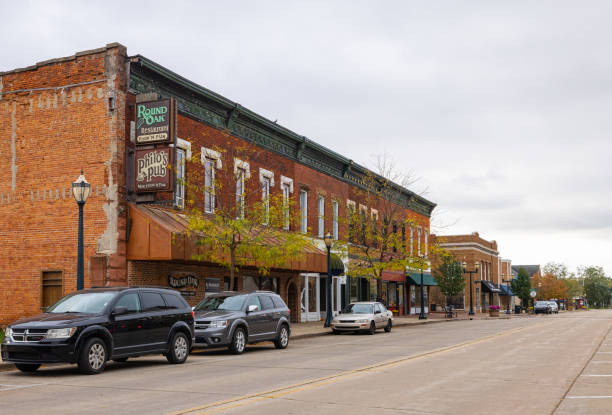
Define function to plot images side by side, we will use this function to plot the original image next to the segmented image
def plot_images(image, results):
    _, axes = plt.subplots(1, 2, figsize=(10, 5))

    axes[0].imshow(image)
    axes[0].axis('off')
    axes[0].set_title('Original')

    masked = Image.composite(image, Image.new('RGB', image.size, (0, 0, 0)), results)

    axes[1].imshow(masked)
    axes[1].axis('off')
    axes[1].set_title('Segmented')

    plt.show()
Run Semantic Segmentation using Hugging Face API#
In the next cells, we are going to download three different models using transformers.pipeline in image-segmentation mode. As you will see, the other parameters are the model name and the device.
Once the model is downloaded, we can run the inference in the sample image and plot the original and segmented image.
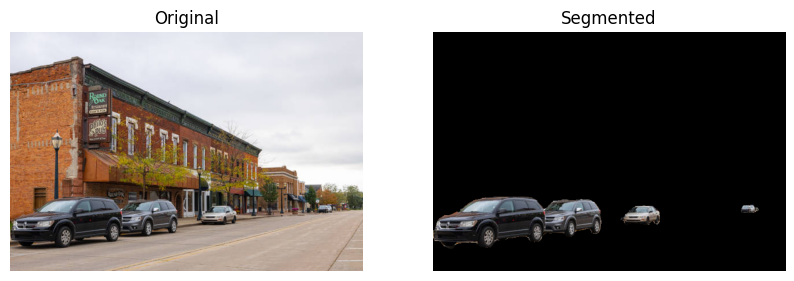
First, we will try the nvidia/segformer-b1-finetuned-cityscapes-1024-1024 model from Hugging Face.
semantic_segmentation = pipeline("image-segmentation", "nvidia/segformer-b1-finetuned-cityscapes-1024-1024", device=device)
results = semantic_segmentation(image)
print(results)
plot_images(image, results[-1]["mask"])
Using a slow image processor as `use_fast` is unset and a slow processor was saved with this model. `use_fast=True` will be the default behavior in v4.52, even if the model was saved with a slow processor. This will result in minor differences in outputs. You'll still be able to use a slow processor with `use_fast=False`.
Device set to use cuda
[{'score': None, 'label': 'road', 'mask': <PIL.Image.Image image mode=L size=612x415 at 0x7FC2A7946C30>}, {'score': None, 'label': 'sidewalk', 'mask': <PIL.Image.Image image mode=L size=612x415 at 0x7FC619F48D40>}, {'score': None, 'label': 'building', 'mask': <PIL.Image.Image image mode=L size=612x415 at 0x7FC2A54F8710>}, {'score': None, 'label': 'wall', 'mask': <PIL.Image.Image image mode=L size=612x415 at 0x7FC2A54FB470>}, {'score': None, 'label': 'pole', 'mask': <PIL.Image.Image image mode=L size=612x415 at 0x7FC2A54FBDD0>}, {'score': None, 'label': 'traffic sign', 'mask': <PIL.Image.Image image mode=L size=612x415 at 0x7FC2A54F8BC0>}, {'score': None, 'label': 'vegetation', 'mask': <PIL.Image.Image image mode=L size=612x415 at 0x7FC2A54FA990>}, {'score': None, 'label': 'terrain', 'mask': <PIL.Image.Image image mode=L size=612x415 at 0x7FC2A54F8FE0>}, {'score': None, 'label': 'sky', 'mask': <PIL.Image.Image image mode=L size=612x415 at 0x7FC2A54F9400>}, {'score': None, 'label': 'car', 'mask': <PIL.Image.Image image mode=L size=612x415 at 0x7FC2A54F9A30>}]
print(f'Semantic segmentation model size: {semantic_segmentation.model.num_parameters() * semantic_segmentation.model.dtype.itemsize / 1024 / 1024:.2f} MB')
Semantic segmentation model size: 52.19 MB
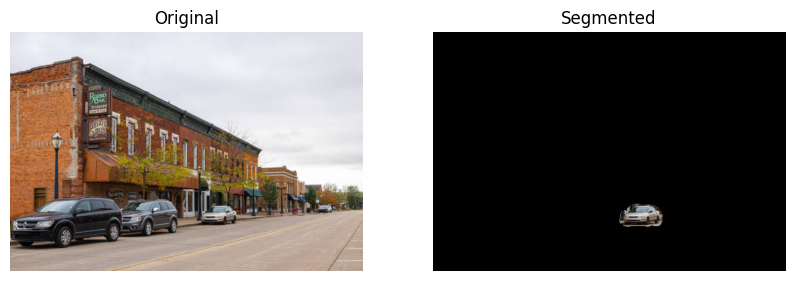
Now, let’s try the facebook/mask2former-swin-large-cityscapes-instance model from Hugging Face.
instance_segmentation = pipeline("image-segmentation", "facebook/mask2former-swin-large-cityscapes-instance", device=device)
results = instance_segmentation(image)
print(results)
plot_images(image, results[2]["mask"])
/opt/conda/envs/py_3.12/lib/python3.12/site-packages/transformers/utils/deprecation.py:172: UserWarning: The following named arguments are not valid for `Mask2FormerImageProcessor.__init__` and were ignored: '_max_size'
  return func(*args, **kwargs)
Device set to use cuda
`label_ids_to_fuse` unset. No instance will be fused.
[{'score': 0.999944, 'label': 'car', 'mask': <PIL.Image.Image image mode=L size=612x415 at 0x7FC2A55AB470>}, {'score': 0.999945, 'label': 'car', 'mask': <PIL.Image.Image image mode=L size=612x415 at 0x7FC2A77CE120>}, {'score': 0.999652, 'label': 'car', 'mask': <PIL.Image.Image image mode=L size=612x415 at 0x7FC2A77CE0C0>}, {'score': 0.903529, 'label': 'person', 'mask': <PIL.Image.Image image mode=L size=612x415 at 0x7FC29FF21700>}]
print(f'Instance segmentation model size: {instance_segmentation.model.num_parameters() * instance_segmentation.model.dtype.itemsize / 1024 / 1024:.2f} MB')
Instance segmentation model size: 822.08 MB
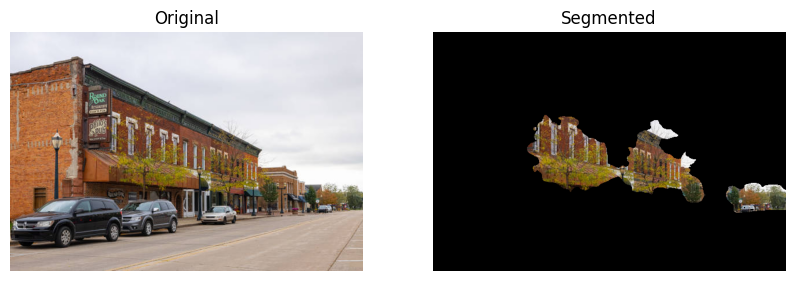
Now, let’s try the facebook/mask2former-swin-large-cityscapes-panoptic model from Hugging Face.
panoptic_segmentation = pipeline("image-segmentation", "facebook/mask2former-swin-large-cityscapes-panoptic", device=device)
results = panoptic_segmentation(image)
print(results)
plot_images(image, results[2]["mask"])
Device set to use cuda
`label_ids_to_fuse` unset. No instance will be fused.
[{'score': 0.999981, 'label': 'car', 'mask': <PIL.Image.Image image mode=L size=612x415 at 0x7FC29FF3B2C0>}, {'score': 0.999958, 'label': 'car', 'mask': <PIL.Image.Image image mode=L size=612x415 at 0x7FC29FF3B770>}, {'score': 0.99997, 'label': 'vegetation', 'mask': <PIL.Image.Image image mode=L size=612x415 at 0x7FC29FF383E0>}, {'score': 0.999575, 'label': 'pole', 'mask': <PIL.Image.Image image mode=L size=612x415 at 0x7FC29FF21F70>}, {'score': 0.999958, 'label': 'building', 'mask': <PIL.Image.Image image mode=L size=612x415 at 0x7FC29FF20260>}, {'score': 0.999634, 'label': 'road', 'mask': <PIL.Image.Image image mode=L size=612x415 at 0x7FC29FF22510>}, {'score': 0.996092, 'label': 'sidewalk', 'mask': <PIL.Image.Image image mode=L size=612x415 at 0x7FC29F0662A0>}, {'score': 0.999221, 'label': 'car', 'mask': <PIL.Image.Image image mode=L size=612x415 at 0x7FC29F1B50A0>}, {'score': 0.99987, 'label': 'sky', 'mask': <PIL.Image.Image image mode=L size=612x415 at 0x7FC29F1B4EC0>}]
print(f'Panoptic model size: {panoptic_segmentation.model.num_parameters() * panoptic_segmentation.model.dtype.itemsize / 1024 / 1024:.2f} MB')
Panoptic model size: 822.09 MB
Copyright (C) 2025 Advanced Micro Devices, Inc. All rights reserved.
SPDX-License-Identifier: MIT