Phi-3-vision Instruct Open Multimodal Model#
The Phi-3-Vision-128K-Instruct is open multimodal model with a focus on very high-quality, reasoning dense data both on text and vision. The model belongs to the Phi-3 model family, and the multimodal version comes with 128K context length (in tokens).
The model provides uses for general purpose AI systems and applications with visual and text input capabilities which require:
memory/compute constrained environments
latency bound scenarios
general image understanding
Optical Character Recognition (OCR)
chart and table understanding
🛠️ Supported Hardware#
This notebook can run in a CPU or in a GPU.
✅ AMD Instinct™ Accelerators
✅ AMD Radeon™ RX/PRO Graphics Cards
⚠️ AMD EPYC™ Processors
⚠️ AMD Ryzen™ (AI) Processors
Suggested hardware: AMD Instinct™ Accelerators, this notebook can run in a CPU as well but inference is CPU will be slow.
⚡ Recommended Software Environment#
🎯 Goals#
Show you how to download a model from HuggingFace
Run Phi-3-vision Instruct on an AMD platform
Prompt the model with an image and ask for insights
🚀 Run Phi-3-vision Instruct on an AMD Platform#
Import the necessary packages
from PIL import Image
import requests
from transformers import AutoModelForCausalLM, AutoProcessor
import torch
Check if GPU is available for acceleration.
Note
Running the model on a GPU is strongly recommended. If your device is cpu, the model token generation will be slow.
device = torch.device('cuda' if torch.cuda.is_available() else 'cpu')
print(f'{device=}')
device=device(type='cuda')
Download model and token processor
model_id = "microsoft/Phi-3-vision-128k-instruct"

model = AutoModelForCausalLM.from_pretrained(model_id,
                                             device_map=device,
                                             trust_remote_code=True,
                                             torch_dtype="auto",
                                             _attn_implementation='eager')
processor = AutoProcessor.from_pretrained(model_id, trust_remote_code=True)
/opt/conda/envs/py_3.10/lib/python3.10/site-packages/transformers/models/auto/image_processing_auto.py:520: FutureWarning: The image_processor_class argument is deprecated and will be removed in v4.42. Please use `slow_image_processor_class`, or `fast_image_processor_class` instead
  warnings.warn(
print(f'Model size: {model.num_parameters() * model.dtype.itemsize / 1024 / 1024:.2f} MB')
Model size: 7909.05 MB
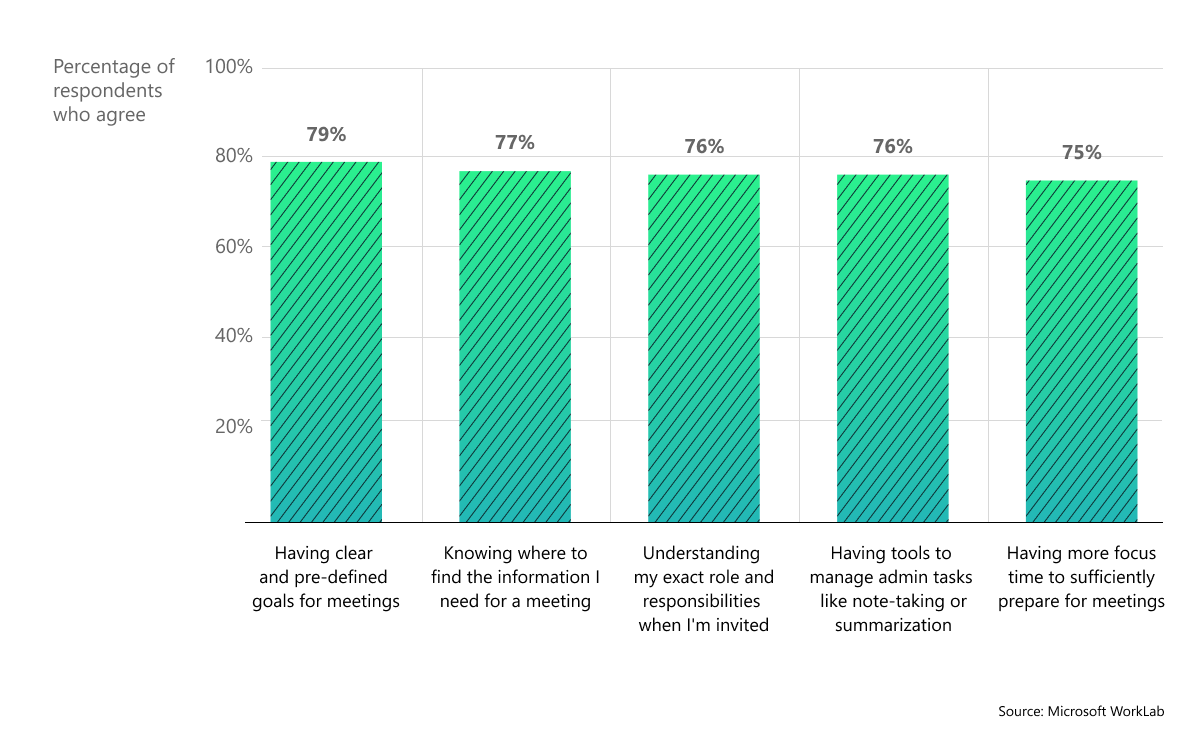
Download and show image that will be provided to the model
url = "https://assets-c4akfrf5b4d3f4b7.z01.azurefd.net/assets/2024/04/BMDataViz_661fb89f3845e.png"

slide_name = 'datasets/slide_phi.png'
with open(slide_name, 'wb') as handler:
    handler.write(requests.get(url).content)

image = Image.open(slide_name)
image
The generation_args is a helper dictionary that we will pass to the pipeline object, we specify certain parameters, such as the max tokens, temperature (creativity of the model) and sample (if True it would select from the most likely output tokens).
generation_args = {
    "max_new_tokens": 512,
    "temperature": 0.01,
    "do_sample": False,
    "eos_token_id": processor.tokenizer.eos_token_id
}
Define the prompt, the prompt contains a one-shot prompt with an example (user and assistant) of the type of answer we want from the model. Then, we provide our actual question for the chart we want the model to give us insightful questions.
Then, we tokenize the messages prompt we defined. Finally, we join the text prompt and the chart into inputs. inputs will be then fed to the model.
messages = [
    {"role": "user", "content": "<|image_1|>\nWhat is shown in this image?"},
    {"role": "assistant", "content": "The chart displays the percentage of respondents who agree with various statements about their preparedness for meetings. It shows five categories: 'Having clear and pre-defined goals for meetings', 'Knowing where to find the information I need for a meeting', 'Understanding my exact role and responsibilities when I'm invited', 'Having tools to manage admin tasks like note-taking or summarization', and 'Having more focus time to sufficiently prepare for meetings'. Each category has an associated bar indicating the level of agreement, measured on a scale from 0% to 100%."},
    {"role": "user", "content": "Provide insightful questions to spark discussion."}
]

prompt = processor.tokenizer.apply_chat_template(messages, tokenize=False, add_generation_prompt=True)
inputs = processor(prompt, [image], return_tensors="pt").to(device)
Generate model response, we will get the model to provide insightful questions about the chart
generate_ids = model.generate(**inputs, **generation_args)
/opt/conda/envs/py_3.10/lib/python3.10/site-packages/transformers/generation/configuration_utils.py:590: UserWarning: `do_sample` is set to `False`. However, `temperature` is set to `0.01` -- this flag is only used in sample-based generation modes. You should set `do_sample=True` or unset `temperature`.
  warnings.warn(
The `seen_tokens` attribute is deprecated and will be removed in v4.41. Use the `cache_position` model input instead.
`get_max_cache()` is deprecated for all Cache classes. Use `get_max_cache_shape()` instead. Calling `get_max_cache()` will raise error from v4.48
/ROCM_APP/models/hf/modules/transformers_modules/microsoft/Phi-3-vision-128k-instruct/c45209e90a4c4f7d16b2e9d48503c7f3e83623ed/image_embedding_phi3_v.py:197: UserWarning: Phi-3-V modifies `input_ids` in-place and the tokens indicating images will be removed after model forward. If your workflow requires multiple forward passes on the same `input_ids`, please make a copy of `input_ids` before passing it to the model.
  warnings.warn(
You are not running the flash-attention implementation, expect numerical differences.
We can now detokenize the output of model and print response
generate_ids = generate_ids[:, inputs['input_ids'].shape[1]:]
response = processor.batch_decode(generate_ids, skip_special_tokens=True, clean_up_tokenization_spaces=False)[0]

print(f'Prompt:\n {messages[2]["content"]}\n\nResponse:\n{response}')
Prompt:
 Provide insightful questions to spark discussion.

Response:
1. What are the most significant barriers to meeting preparedness according to the respondents?
2. How does the level of agreement with each statement correlate with the respondents' overall satisfaction with their meetings?
3. Are there any notable differences in agreement levels between different demographics or job roles?
4. What strategies have been most effective in helping respondents prepare for meetings, based on their feedback?
5. How might organizations use this data to improve meeting preparation and effectiveness?
Tip
Exercise for the readers, modify the generation_args configuration, for instance increase the value of temperature (max is 2.0) and set do_sample to True. What is the outcome?
Copyright (C) 2025 Advanced Micro Devices, Inc. All rights reserved.
SPDX-License-Identifier: MIT