Residual Network - ResNet50#
ResNet-50 is a convolutional neural network (CNN) that performs very well at image classification, when it was released introduced the innovative idea of residual neural network (also referred as skip connections) that are still in use today.
🛠️ Supported Hardware#
This notebook can run in a CPU or in a GPU.
✅ AMD Instinct™ Accelerators
✅ AMD Radeon™ RX/PRO Graphics Cards
✅ AMD EPYC™ Processors
✅ AMD Ryzen™ (AI) Processors
Suggested hardware: AI PC powered by AMD Ryzen™ AI Processors
⚡ Recommended Software Environment#
🎯 Goals#
Show you how to download a model from PyTorch Hub
Run ResNet50 a popular model on an AMD platform
Evaluate the output probabilities and get the top 5 categories for different images
🚀 Run ResNet50 on an AMD Platform#
Import the necessary packages
import torch
from PIL import Image
import requests
import matplotlib.pyplot as plt
import os
import numpy as np
Check if GPU is available to be used
device = torch.device('cuda' if torch.cuda.is_available() else 'cpu')
print(f'{device=}')
device=device(type='cuda')
Download model and utilities from torch hub and move the model to the device, in case you have a GPU
import torchvision.models.resnet as resnet
resnet50 = resnet.resnet50(weights=resnet.ResNet50_Weights.DEFAULT)

resnet50.eval()
resnet50.to(device);
Downloading: "https://download.pytorch.org/models/resnet50-11ad3fa6.pth" to /ROCM_APP/models/torch/hub/checkpoints/resnet50-11ad3fa6.pth
100%|██████████████████████████████████████████████████████████████████████████████████████████████| 97.8M/97.8M [00:01<00:00, 94.0MB/s]
Download the imagenet classes labels if they do not already exists and then load them into the categories variable
imagenet_classes = 'datasets/imagenet_classes.txt'
if not os.path.exists(imagenet_classes):
    with open(imagenet_classes, 'wb') as handler:
        handler.write(requests.get('https://raw.githubusercontent.com/pytorch/hub/master/imagenet_classes.txt').content)
with open(imagenet_classes, "r") as f:
    categories = np.array([s.strip() for s in f.readlines()])
Define list of images that we will use for inference
uris = [
    'http://images.cocodataset.org/test-stuff2017/000000024309.jpg',
    'http://images.cocodataset.org/test-stuff2017/000000028117.jpg',
    'http://images.cocodataset.org/test-stuff2017/000000006149.jpg',
    'http://images.cocodataset.org/test-stuff2017/000000004954.jpg',
]
Now, we will define an image transformation (img_transforms). The transformation will resize the image to a dimension of 256 x 256, will center it, converted to tensor and finally will normalize it. The function prepare_image_from_uri gets an URI (Uniform Resource Identifier) and either downloads it from the Internet or opens a local file, then it applies the img_transforms. Finally, we add the batch dimension with unsqueeze(0)
import torchvision.transforms as transforms
import validators

img_transforms = transforms.Compose([
    transforms.Resize(256),
    transforms.CenterCrop(224),
    transforms.ToTensor(),
    transforms.Normalize(mean=[0.485, 0.456, 0.406], std=[0.229, 0.224, 0.225])
    ]
)

def prepare_image_from_uri(uri):
    if (validators.url(uri)):
        img = Image.open(requests.get(uri, stream=True).raw)
    else:
        img = Image.open(uri)

    return img_transforms(img).unsqueeze(0)
Create a tensor with the four images we defined above
batch = torch.cat([prepare_image_from_uri(uri) for uri in uris]).to(device)
print(f'{batch.shape=}')
batch.shape=torch.Size([4, 3, 224, 224])
Execute the inference inside the torch.no_grad() context not to track gradients. The output of the model is then feed to a softmax function to get the likelihood of each class. You can observe that the output is a tensor of shape [4, 1000].
with torch.no_grad():
    output = torch.nn.functional.softmax(resnet50(batch), dim=1)

print(output.shape)
torch.Size([4, 1000])
Let’s define a function that takes the predictions and the number of top categories we would like to report. We start by sorting the prediction in descending order, meaning from biggest to smallest and picking the first n. Then we iterate over each inference to produce a list with the category label and the probability.
def get_top_n(predictions, n=5):
    top_n = torch.argsort(predictions, descending=True)[:, :n].cpu().numpy()
    results = []

    for idx, tops in enumerate(top_n):
        r = []
        for c, v in zip(categories[tops], predictions[idx][tops]):
            r.append(f'{c}: {v*100:.1f}%')
        results.append(r)
    return results
Let’s call the function and print the results
results = get_top_n(output, n=5)
print(results)
[['laptop: 7.7%', 'notebook: 6.7%', 'desk: 5.9%', 'mouse: 5.4%', 'bookshop: 1.4%'], ['mashed potato: 32.8%', 'meat loaf: 8.9%', 'broccoli: 5.0%', 'plate: 3.6%', 'ice cream: 0.6%'], ['racket: 27.0%', 'tennis ball: 13.5%', 'ping-pong ball: 0.6%', 'volleyball: 0.2%', 'tricycle: 0.2%'], ['malinois: 9.8%', 'German shepherd: 7.3%', 'flat-coated retriever: 4.2%', 'kelpie: 4.1%', 'tennis ball: 3.2%']]
Using torch.topk we can get the top probabilities as well as the index
torch.topk(output, 5)
torch.return_types.topk(
values=tensor([[0.0769, 0.0667, 0.0593, 0.0536, 0.0143],
        [0.3281, 0.0889, 0.0500, 0.0357, 0.0065],
        [0.2699, 0.1350, 0.0062, 0.0024, 0.0018],
        [0.0979, 0.0727, 0.0419, 0.0414, 0.0317]], device='cuda:0'),
indices=tensor([[620, 681, 526, 673, 454],
        [935, 962, 937, 923, 928],
        [752, 852, 722, 890, 870],
        [225, 235, 205, 227, 852]], device='cuda:0'))
torch.argsort(output, descending=True)[:, :5].cpu().numpy()
array([[620, 681, 526, 673, 454],
       [935, 962, 937, 923, 928],
       [752, 852, 722, 890, 870],
       [225, 235, 205, 227, 852]])
Finally, we plot each of the images with the top 5 classes detected and their probability.
for uri, result in zip(uris, results):
    img = Image.open(requests.get(uri, stream=True).raw)
    img.thumbnail((256,256), Image.LANCZOS)
    plt.imshow(img)
    plt.axis('off')
    plt.show()
    print(f'{result}\n\n\n')
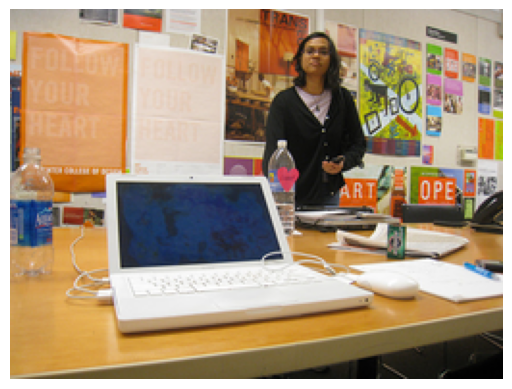
['laptop: 7.7%', 'notebook: 6.7%', 'desk: 5.9%', 'mouse: 5.4%', 'bookshop: 1.4%']
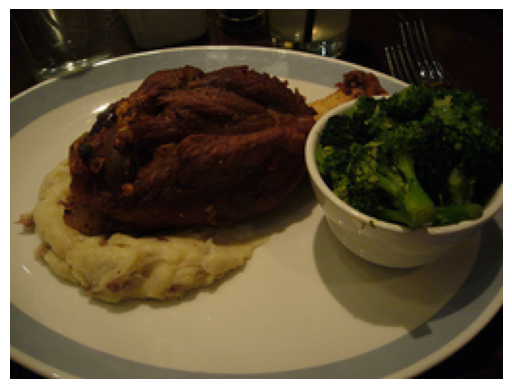
['mashed potato: 32.8%', 'meat loaf: 8.9%', 'broccoli: 5.0%', 'plate: 3.6%', 'ice cream: 0.6%']
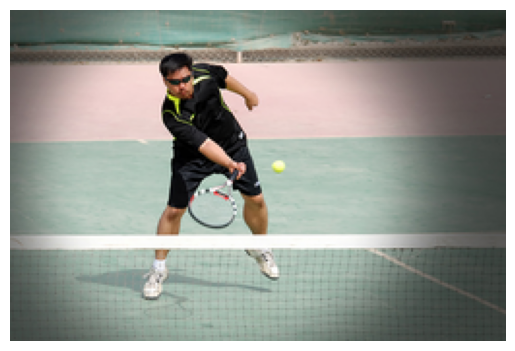
['racket: 27.0%', 'tennis ball: 13.5%', 'ping-pong ball: 0.6%', 'volleyball: 0.2%', 'tricycle: 0.2%']
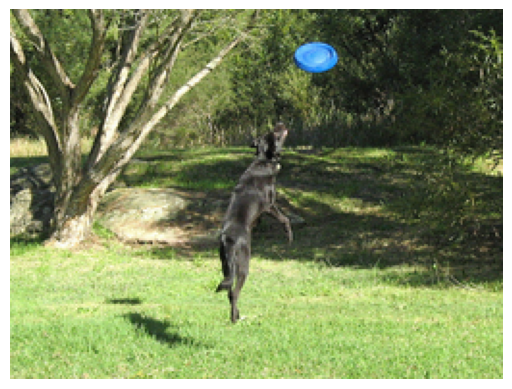
['malinois: 9.8%', 'German shepherd: 7.3%', 'flat-coated retriever: 4.2%', 'kelpie: 4.1%', 'tennis ball: 3.2%']
Copyright (C) 2025 Advanced Micro Devices, Inc. All rights reserved.
SPDX-License-Identifier: MIT