Overview#
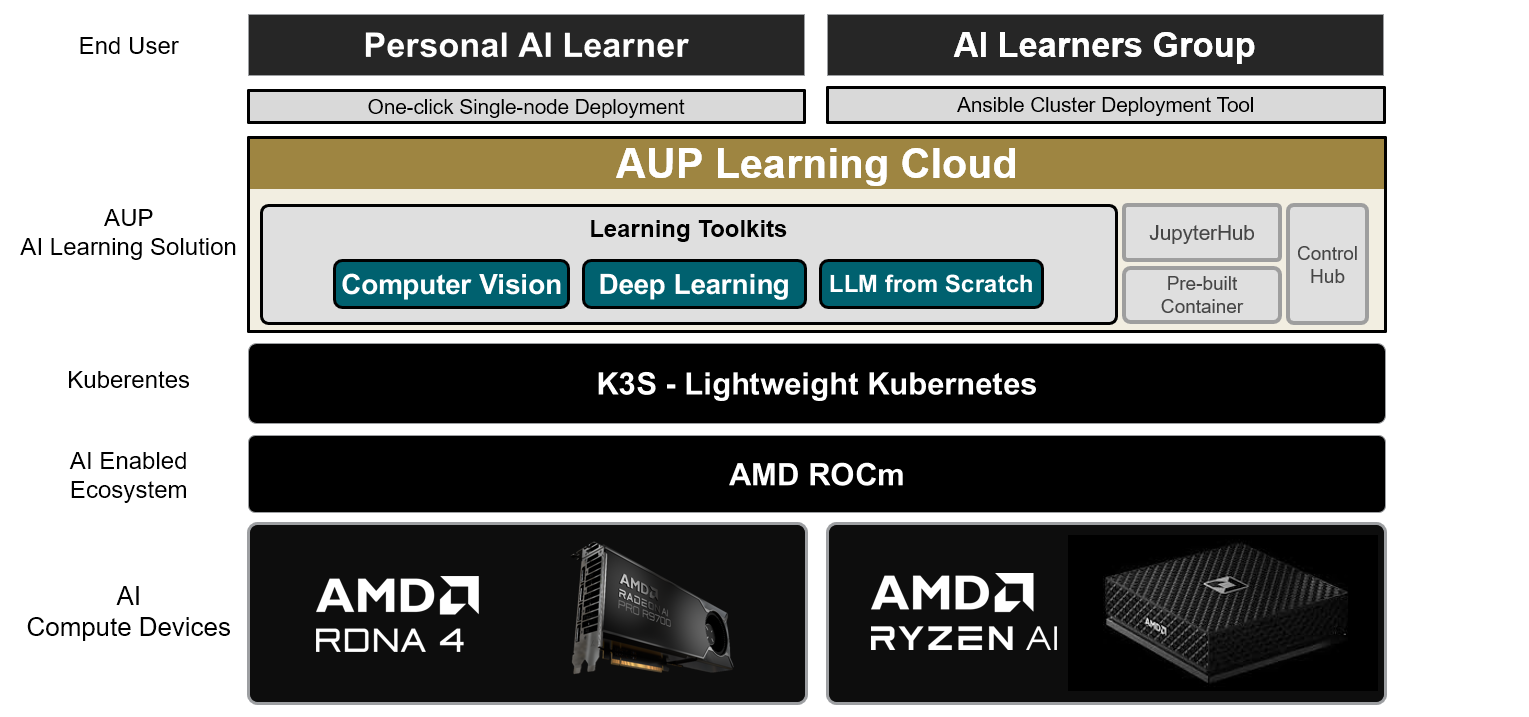
AUP Learning Cloud is a JupyterHub-based learning platform for curated course environments, custom repositories, and shared GPU-enabled workspaces on Kubernetes.
What It Provides#
Resource Selection At Spawn Time#
Users do not launch into a single fixed notebook image. The platform presents a resource picker that can expose:
course environments such as CV, DL, LLM, and PhySim
generic CPU or GPU environments
accelerator-specific options defined by the deployment
optional Git repository cloning on startup
What each user can see is controlled by JupyterHub group membership and custom.teams.mapping.
Multiple Authentication Modes#
The Hub currently supports four authentication modes:
auto-logindummygithubmulti
multi combines GitHub App and native local accounts on one login page. In GitHub-backed deployments, GitHub team membership can be synchronized into JupyterHub groups and used for resource access control.
Admin Console#
The built-in admin console at /hub/admin includes:
a Users view for creating users, resetting passwords, managing quotas, and starting or stopping servers
a Groups view for reviewing group membership and group-to-resource mappings
a Dashboard view for usage analytics, active sessions, pending spawns, and resource distribution
Quota And Usage Tracking#
When quota is enabled, the platform tracks usage sessions, enforces minimum balance before spawn, supports unlimited users, and can apply scheduled refresh rules with Kubernetes CronJobs.
Monitoring And Metrics#
The chart can expose Hub metrics to Prometheus and optionally install ServiceMonitor, PrometheusRule, and Grafana dashboard resources.
Deployment Modes#
Single-Node#
The primary workstation/developer flow uses ./auplc-installer to install K3s, prepare runtime values, and deploy the Hub.
The checked-in default values in this repository currently describe a local deployment with:
NodePort access on
30890local-pathstorageingress disabled
prePuller disabled
Existing Kubernetes#
Deploy AUP Learning Cloud onto an existing Kubernetes cluster when the cluster, nodes, networking, and storage are already managed for you. This path uses Helm and does not provision the cluster or its nodes.
New Multi-Node K3s#
When each machine already has an operating system and SSH access, use the playbooks in deploy/ansible/ to provision K3s and prepare the hosts. After the cluster is ready, deploy AUP Learning Cloud with Helm, using runtime/values-multi-nodes.yaml.example as the starting point.
NFS storage, ingress, TLS, and other production-oriented components are deployment choices, not mandatory defaults.
Learning Solutions#
AUP Learning Cloud currently ships the following learning toolkits:
Computer Vision
Deep Learning
Large Language Models
Physics Simulation
Acknowledgment#
AUP would like to thank the following universities and professors. This learning solution was made possible through the joint efforts of these partners.
University |
Professors and Labs |
Toolkits |
|---|---|---|
National Taiwan University |
DL, CV |
|
Nanjing University |
LLM |
The following repositories and icons are used in AUP Learning Cloud, either in close to original form or as an inspiration: